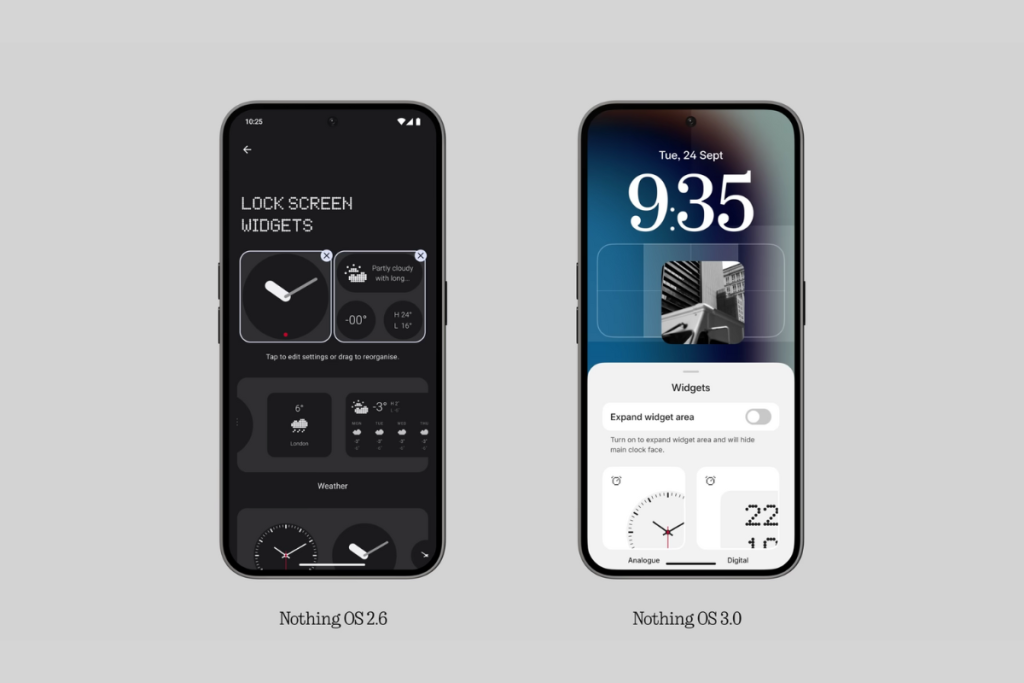
Nothing phones has a great software experience with Nothing OS 2.5 was one of the best custom skins based on Android 14. Nothing has already announce the much-awaited Nothing OS 3.0, sharing details about the beta and stable release, as well as the new features.
Release Timeline of Nothing OS 3.0
Nothing OS 3.0, based on Android 15, was launch on 24th September 2024 via the company’s official YouTube channel.
And it didn’t share a roadmap with exact dates, Nothing confirm that the open beta will arrive in early October 2024, and the stable build will begin rolling out in December 2024.
Nothing Phone (2a) Plus, Nothing Phone (2a), and Nothing Phone (2) should be the first in line to get the Android 15-based Nothing OS 3.0 update, followed by CMF Phone 1 and Nothing Phone (1).
Eligible Devices of Nothing OS 3.0
- Nothing Phone (2a)
- Nothing Phone (2)
- Nothing Phone (1)
- CMF Phone 1
Nothing promises three Android upgrades for all smartphones, except for the CMF Phone 1, which will only get two OS upgrades.
The Nothing Phone (1) is the oldest device on the list release with Android 12 out of the box.
Means, Android 15 would be the final OS upgrade for this device.
Features of Nothing OS 3.0
- Nothing Gallery App : Nothing OS 3.0 is confirm to bring the Nothing Gallery app. As shown during the launch, the new Nothing Gallery app opens a photo as soon as the user taps on it. The Gallery app uses artificial intelligence (AI) to find key moments within your photos and displays them in a bigger thumbnail to make them quickly noticeable. It also has AI image segmentation to highlight the key object and segment it out from the rest of the image in the thumbnail to make it easy to find. Nothing is aware of the long transition time from Camera to Google Photos. As per Nothing, the transition to Nothing Gallery should be 1.4 seconds faster. Also, the processing time for HDR and portrait effects will be up to 25% faster. The Nothing has also confirm that it will add more automatic AI image categorization, natural language search, and many more AI features in the future. AI upscaling, Super Resolution, and AI image generation capabilities will also be introduce sometime in the future.
- Redesign Lock Screen : The lock screen in Nothing OS 3.0 is customizable. As, you have multiple clock faces to choose from. Some are inspire by Apple’s iOS, and some are completely unique. You can tap the widget area and toggle on Expand widget mode to add more widgets to the expanded widget area.
- New Animations : Nothing OS 3.0 also brings some cool animations. First is the new fingerprint animation, where the dots move and breathe outwards when you press and hold your finger. The new OS also has a new charging animation. Again, it’s a dot design language that makes it the Nothing’s way. When you connect the charger, the dots move from the bottom to the top, which looks a lot better than before. The Weather app now shows the icon in a cool dot matrix style, which can be animated as well.
- Redesign Quick Settings : The Quick Settings panel is getting a significant upgrade with Nothing OS 3.0. It looks cleaner than before and resembles Nothing’s design language. First, the Wi-Fi and Bluetooth icon sizes have reduce significantly to accommodate more icons. The Nothing OS 3.0 allows users to customize the size of the tiles, similar to home screen widgets. Some tiles give you more options when you increase their size. The active tile now becomes red for quick differentiation from inactive tiles. While it’s a subtle change, the red accent adds to a better aesthetic. And lastly, the brightness slider has added.
- App Pinning and Categorization : Nothing OS 3.0 makes useful changes to the app drawer to access the require app quickly. As, it lets you pin your favorite apps at the top of the app drawer. Pinning the apps you open frequently might save you a lot of time. Another useful feature of the Nothing OS 3.0 is the app categorization, which Nothing calls Smart Drawer. Inspire by iOS, this feature automatically sorts all your apps into different categories. First, you have a row with four AI-suggest apps, follow by categories of apps.
- Redesign Settings App : The Settings app menu in Nothing OS 3.0 gets a new look. The sizes of the Network and Internet and Connect devices options have shrunk and place horizontally, similar to the rest of the options, which, in my opinion, adds fluidity to the menu. All the menu options are now separate by a small gap. Other change is that the Dot Matrix text has been replace with Roboto. It’s one of the most readable fonts and has apply across the system.
- New Widgets and Widget Sharing : Nothing phones already have over 20 widgets, and the company promises to keep expanding the bucket to allow users to easily access more information without having to open the app. In the Nothing OS 3.0, there’s a new countdown widget. The new widget allows you to track time towards a specific date. You can also use it to display year’s progress or your birthday. Nothing OS 3.0 also introduces Share Widgets. This feature allows you to share widgets with someone. It’s a nice way to share your fitness progress or screen time.