


Digital payment apps has made paying monthly utility bills a far convenient process. The growth of billing and payment apps in India has made tasks like paying for electricity, gas, broadband, water, or DTH services quick, secure, and accessible from anywhere.
Most major utilities are now integrate into payment platforms, and these services have become part of everyday digital routines, much like UPI transfers and wallet payments.
Apps such as Google Pay, PhonePe, Paytm, Amazon Pay, and BHIM UPI are usually the most commonly use for recurring bill payments.
Apart from the convenience factor, making bill and utility payments through these apps bundles many other benefits, too.
Many of them also offer cashback, reward points, and scratch cards.
And incremental, these rewards can add up over time for users who regularly pay multiple bills each month.
Google Pay remains one of the most popular choices because of its clean and simple UI, integration with UPI, and automatic bill reminders.
Features like multi-bank support and detail transaction history enhance the convenience factor.
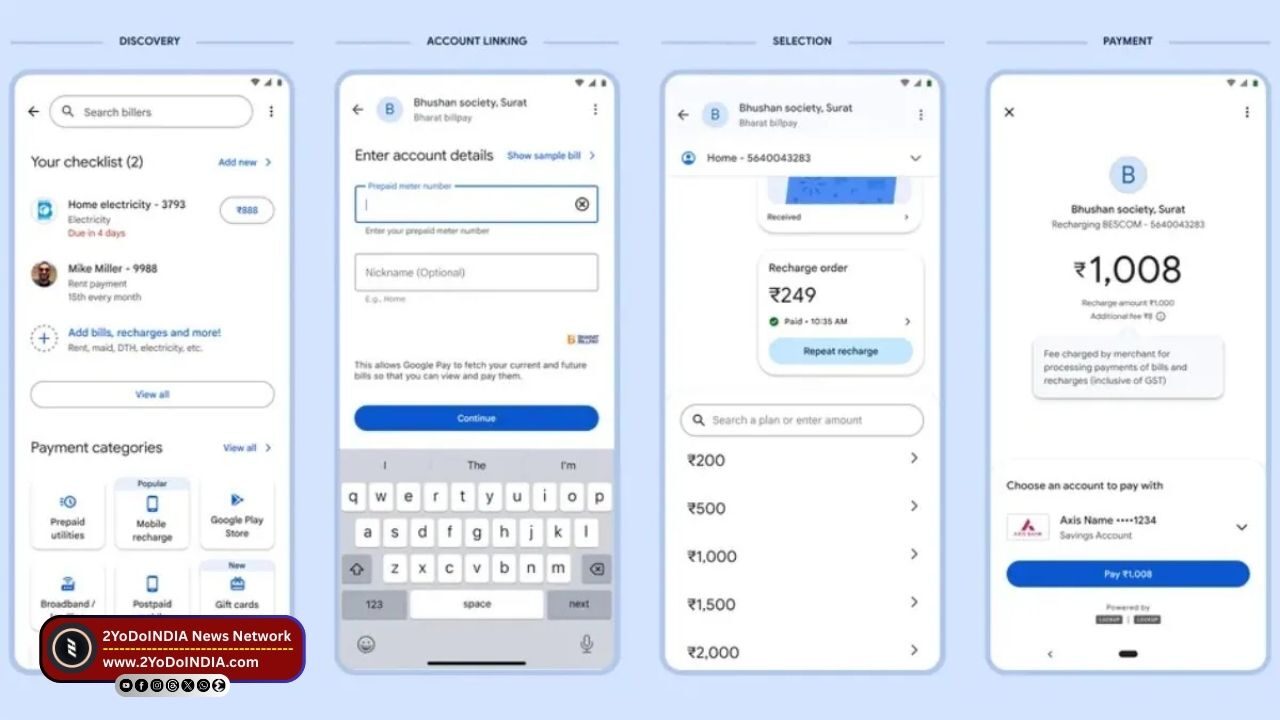
Paying your electricity, water, or DTH bill using Google Pay is a simple and secure process.
How to Pay Electricity, Water and DTH Bills via Google Pay?
Follow These Steps :
- Open Google Pay on your Android or iOS device.
- Scroll down to the Bills and Payments section.
- Tap Bill Payments under Services
- Select the category you want to pay for, Electricity, Water, Gas, Broadband, DTH or Mobile Postpaid
- From the list, choose your service provider, like Tata Power, BSES, Airtel DTH, or your local utility board.
- Enter your Customer ID, Consumer Number, or Account Number, as require
- Tap Link Account to connect your utility account to GPay.
- The app will fetch outstanding bill details if available
- Verify the amount and select your payment method (bank account via UPI)
- Tap Pay Bill and authenticate using your UPI PIN
- You will receive an instant confirmation on the app.
- When the transaction completes, you will see a receipt and may receive cashback or rewards depending on eligibility.
NOTE : It may take up to 3 business days for the payment to reflect in your utility provider’s records


